In the examples below, you’ll notice a pattern: the sender borrows trust from a well-known brand or authority figure, then tries to rush you into clicking a button, opening a shared file, or calling a phone number. When the stakes feel high and the deadline feels immediate, most people stop verifying details and start reacting.
Today, TechKnowledgey breaks down the most common timing trends and tactics behind these scams, what to watch for in sender details and links, and how to respond to an incident if someone’s already clicked.
- Missed Delivery
- Phishing Detected
- Government Entity
- Shared Document
- Urgent Deadline
- Wire Fraud
- Subscriptions Expiring
1: Missed Delivery
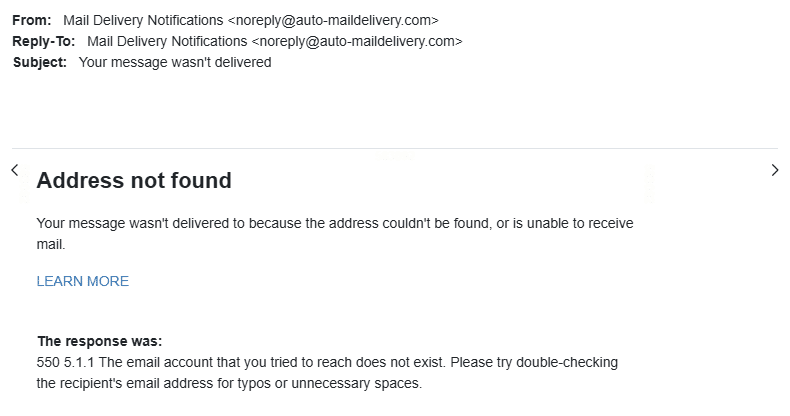
A “message wasn’t delivered” notice can be legitimate, but this email has several signs it may be a phishing lure or, at best, an untrustworthy bounce. The email claims “Address not found” and includes the SMTP response code 550 5.1.1 (which is a real error). Attackers often reuse real-looking codes because they look technical and convincing.
One of the biggest red flags is that the notice appears to come from a generic-looking “mail delivery” sender rather than a clearly identifiable, expected mail system. Most real bounce messages come from your mail provider (Gmail, Microsoft 365, etc.) or the recipient’s mail server. When the sender looks third-party or “auto-generated” in a vague way, it’s often a tactic to borrow credibility while hiding the message’s true origin.
Legitimate non-delivery reports repeat key details: they often quote part of your original email, show a message ID, include timestamps, and clearly state which specific recipient address failed. Many will also repeat the failed address in multiple places, so you can spot a typo fast. When that detail is missing, and the content stays broad, it’s a cue to slow down and take a second look.
The “LEARN MORE” link is also a classic phishing move. Instead of helping, it may route you to a fake sign-in page. Safest path: don’t click, then check your Sent folder for the message you allegedly sent. Report the email as phishing if anything feels off.
2: Phishing Detected (AKA Reverse Psychology)

If you think a scam’s already happened, you may be lax about emails that report it.
This message urges immediate action through a “Review recent activity” button, which likely leads to a fake sign-in page designed to steal credentials. While it mimics the brand’s layout and tone, phishing versions often contain subtle differences in the sender address or link destination. Real alerts can be verified safely by signing in directly, not through embedded links.
3: Government Entity
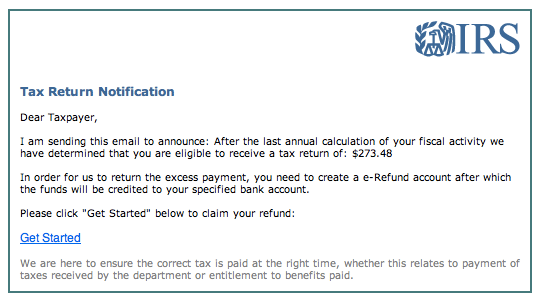
Here’s a classic IRS-themed phishing scam designed to trigger urgency around taxes. It claims you’re “eligible to receive a tax return” and lists a specific refund amount, then pushes you to click “Get Started” and create an “e-Refund account.” The IRS doesn’t ask you to create special accounts through email links to receive refunds.
The greeting (“Dear Taxpayer”) is generic, and the wording is awkward, both of which were probably copied and pasted from scam templates. The main risk is the link, which likely leads to a fake IRS lookalike page that asks for personal details, banking info, or Social Security numbers.
These scams can claim either that the IRS has money waiting for you or that your tax payments haven’t been processed, both meant to pressure for fast action.
4: Shared Document (and/or Free Money)
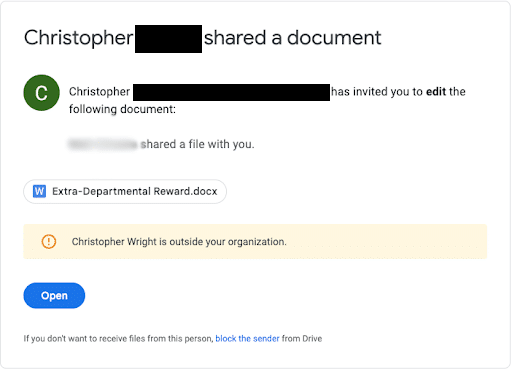
Speaking of free money scams, this “shared document” invite is a common way attackers deliver malware or steal logins. The message claims someone shared a file named something like “Extra-Departmental Reward.docx,” which sounds like a bonus or payout. That’s a classic lure: money plus urgency.
The biggest red flag is the lack of context. You’re being invited to edit a document with no clear connection to your role, team, or current projects. If a corporate office or agency were managing bonuses or rewards, wouldn’t they contact you directly through official HR channels instead of sending a random Google Drive document invite?
Another warning sign is the banner noting the sender is “outside your organization.” External sharing is not automatically malicious, but it should raise scrutiny (especially when the file name is incentive-based and unexpected).
Again, just clicking “Open” can be harmful, even if you don’t plan to enter information. The link can lead to a fake sign-in page, trigger a malicious download, or prompt you to authorize access to your Google account.
5: Urgent Deadline

This screenshot is a textbook example of spear phishing that often escalates into CEO fraud. It targets the finance team, uses a friendly tone (“do me a favour?”), and tries to shortcut normal payment controls by pushing a same-day transfer.
The sender address is from an external-looking domain. That mismatch is a major warning sign. The message also claims the boss is on holiday and cannot access accounts, which is a common pretext used to explain why the request is unusual.
Several lines are designed to increase pressure and reduce verification. It demands action “TODAY,” asks you to look in spam for a vendor email, and tells you to click the link and transfer funds to an account “they specify.” It also blocks safer confirmation by saying “I can’t take calls right now” and to reply only by email.
Take a breath, reread carefully, and remember this equation:
High stakes + urgent deadline = lowered awareness
6: Wire Fraud
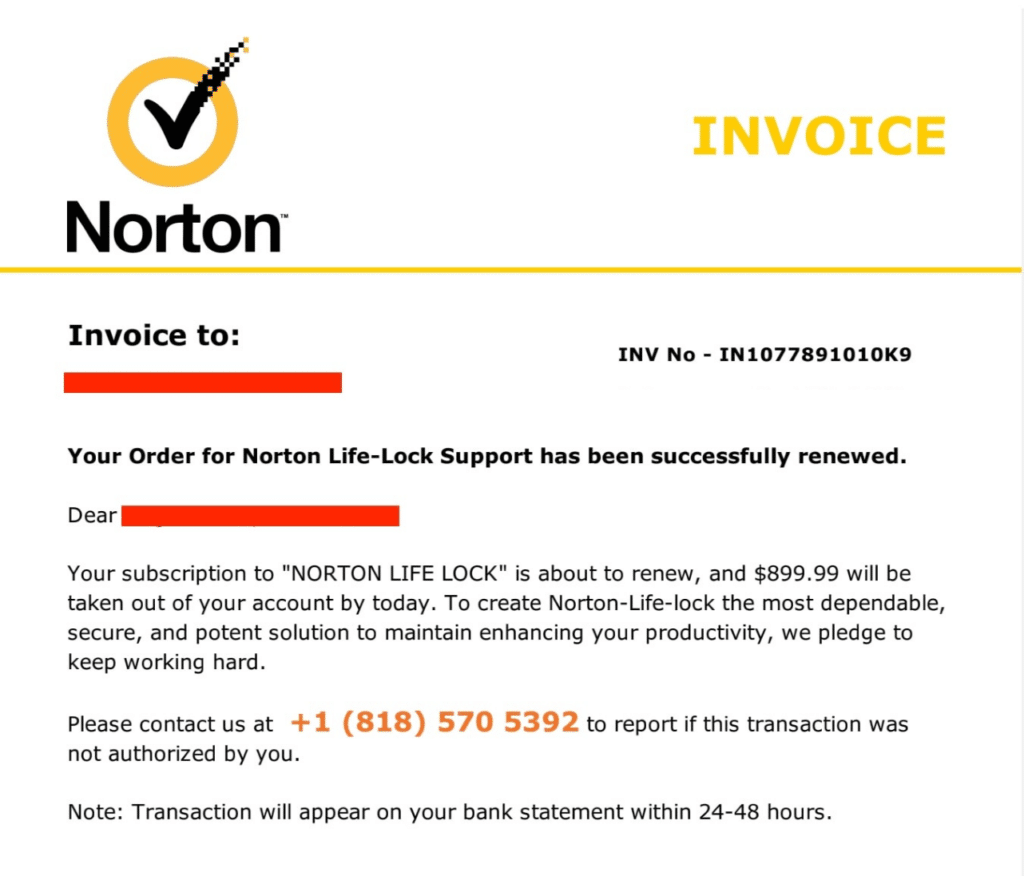
This supposed invoice is a common billing scam that uses brand authority the same way CEO fraud uses an authority figure. The hook is fear: it claims a large charge is about to hit your account “by today,” then pushes you to call a number to dispute it. That phone call is the trap. The scammer will try to collect financial information, convince you to install remote access tools, or walk you into a refund scheme.
7: Not My Subscriptions!
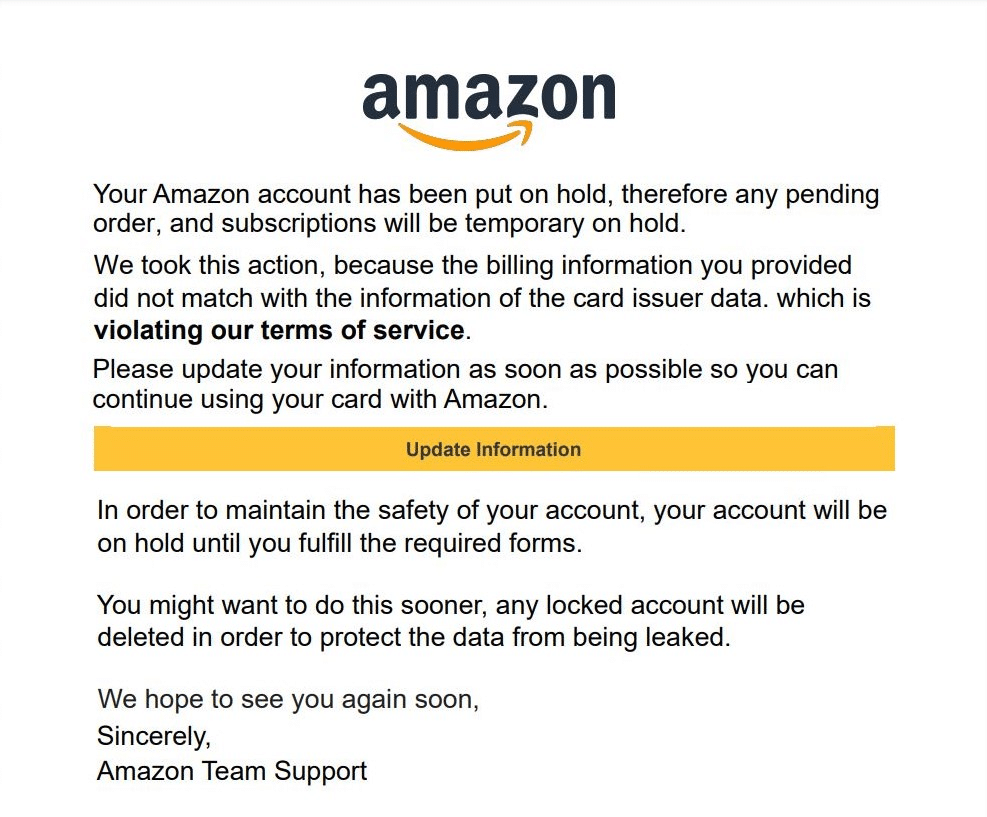
Not all scams arrive at business emails, though. This fake Amazon “account on hold” notice plays on fear and convenience by claiming your billing info is mismatched and pressing you to click “Update Information” right away and lose your data to malicious actors.
That button often leads to a fake website built to steal your login, card details, or bank account info. People put emotional attachments to their personal subscriptions, lowering their guard when they think they’re at risk. Verify by opening Amazon in your browser directly and checking your account alerts there.
FAQs
When Are Scams Most Likely To Hit?
Scam volume spikes when people are busy, and workflows speed up. The biggest waves are around Christmas and other gift-giving occasions (Amazon spoofing, package delivery notices). You’ll also see a bump at end-of-quarter when finance teams are slammed, and approvals move faster.
Are Some Industries Targeted More During Certain Seasons?
Yes. Attackers time campaigns to your “busy season” because distractions are high and attention is split. Accountants and tax firms get hit hard during filing season. Nonprofits often see more attempts during major giving periods.
The week before a holiday, during the holiday, and right after are prime windows. Monitoring is lighter, key approvers are out, and people come back to a full inbox, which makes “urgent” messages feel normal.
Why Do Fake Brand Emails Trick People So Often?
Familiar brands lower your guard. Many scams spoof a legitimate sign-in page. If you click and enter credentials, the attacker can capture them immediately. Also, clicking links or opening attachments can trigger downloads or tracking without you realizing it.
What Should I Look For In The Sender’s Email Address?
Look closely at the domain and handle. Common tricks include swapping 0s for o’s, using look-alike characters or adding subtle extra words. Another red flag is a sender that’s just a long string of numbers or random letters.
What Should I Do If We’ve Been Scammed?
It depends on what was exposed and whether anything was lost.
If credentials were entered (especially Google or Microsoft), change passwords right away, revoke active sessions, turn on MFA, and back up critical data. Then check sign-in history, mailbox rules, and forwarding.
If there’s a data breach, suspected ransomware, or financial loss, treat it like a hands-off “crime scene.” Preserve evidence, involve cyber-insurance (if you have it), and escalate to incident response so fixes don’t overwrite logs or blur what changed.
TL;DR
Scams to watch for:
- Missed Delivery
- Phishing Detected
- Government Entity
- Shared Document
- Urgent Deadline
- Wire Fraud
- Subscriptions Expiring
And above all, watch for any message with these elements:
- Urgency (expiry, withdrawal or charge soon, limited time offer, etc.)
- Free Money (payroll bonus, promotion, tax refund)
- Demanding Money (invoice, unpaid taxes)
- Authority Figures (your boss, big brands, Google, Microsoft)
You have complete control over how you respond to messages, no matter what they claim or who they’re from. When you receive a message that seems odd, take a minute to check it with your boss, company records, or anything else that can confirm it. Never click on links in these emails or fill out information. If there really is a problem with the mentioned account, log in to that account directly.
By confirming the messages you receive, you protect yourself from bad actors who will otherwise take advantage of you.
If your security’s been compromised, or if you’d like to protect yourself against future incidents, TechKnowledgey can step in with a structured, calm response. We’ll help secure accounts, review sign-in activity, identify suspicious rules or access, and contain the issue before it spreads. Get in touch today and experience the difference our expertise can make for your business.